Every feature, no card, no account. When you buy, the same app is unlocked with your licence key — nothing to reinstall.
Open this page on your computer
You are on a phone or a tablet. TradeRecall installs on the computer you trade on — Windows or a Mac. Copy the link and open it there, or come back to this page from that computer.
Get your licence key and the download
Enter your email. We send you your licence key and the download for your computer. No card, no account.
Your email only delivers your licence key. Nothing from your journal ever leaves your computer.
Check your inbox
We sent your licence key and the download links to . If it is not there in a few minutes, look in your spam or junk folder too.
Install
On Windows, TradeRecall is signed, so Windows shows who made it; until enough people have downloaded it, Windows may still ask once whether you trust it. On a Mac, the package is signed and verified by Apple, so TradeRecall opens like any other app. The steps below show where to click — for both systems. You do this once; after that TradeRecall updates itself.
Mac
Apple silicon (M1 or newer), macOS 13 or later. Not sure which chip your Mac has? Apple menu › About This Mac says Chip: Apple M… — Macs with an Intel chip do not run TradeRecall.
Open the downloaded file and drag TradeRecall onto Applications.
Open TradeRecall from Applications. It opens like any other app.
The first time you record, macOS asks about the microphone — press Allow.
Windows
Windows 10 or 11, 64-bit. Most PCs take the x64 package; the ARM package is for Windows laptops with a Snapdragon chip. Trade in Parallels on a Mac? Download the Mac app on your Mac instead — it connects to Sierra Chart and NinjaTrader inside Parallels by itself.
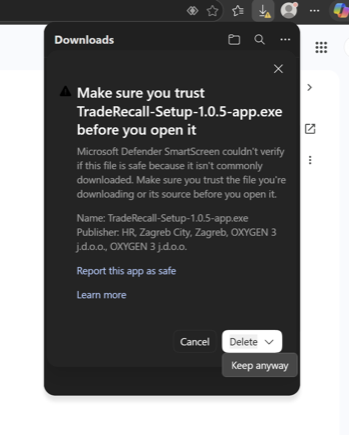
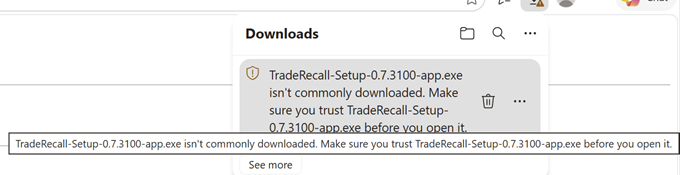
If your browser says the file isn't commonly downloaded, keep it — do not delete it. In Edge: press the arrow next to Delete (or ⋯) › Keep › Show more › Keep anyway. While Edge checks the file — and until you press Keep if it asks — your Downloads folder can show it as "Unconfirmed ….crdownload". It is the same file: wait a moment, or press Ctrl+J and choose Keep.
Run the downloaded installer. If Windows says Windows protected your PC, press More info, then Run anyway.
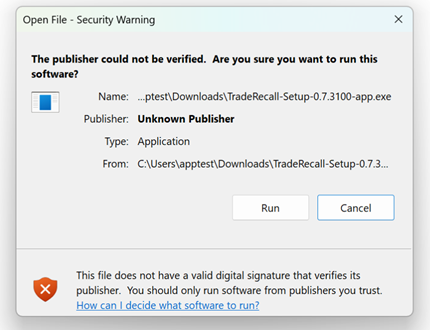
If Windows shows Open File – Security Warning instead, press Run.
Choose your language under Language, then press Install. No administrator password is needed; it installs for you only.
When it is done, press Open TradeRecall.
If Windows 11 blocks the installer with no Run anyway button, Smart App Control is on — write to support at traderecall.app and we will help.
The pictures show an earlier installer's file name; yours carries the version you downloaded.
Installed? The setup guide takes you from the first start to your first recorded trade.
Will it run on my computer?
TradeRecall records every trade, keeps your journal and runs every report on any computer below. The local AI — the part that reads setups, mistakes and plans out of what you say — needs more memory, and TradeRecall picks the model that fits your computer by itself.
Mac
Apple silicon (M1 or newer), macOS 13 or later. Macs with an Intel chip do not run TradeRecall.
Sierra Chart and NinjaTrader run in Windows under Parallels, with its own Windows licence.
Local AI: 24 GB of memory or more, with 8 GB of it given to Windows. 32 GB or more gets a bigger model.
Windows
Windows 10 or 11, 64-bit.
Local AI: 24 GB of memory or more. 32 GB or more gets the biggest model.
A graphics card with its own memory counts on top: what fits on the card does not have to fit in the computer's memory.
Disk space: the models download once, up to about 23 GB, and TradeRecall wants 20 GB left free after them. With less memory than above, voice notes are still transcribed, but not interpreted by the local AI.
Your platform
Sierra Chart and NinjaTrader run on Windows. On a Mac they run in Windows under Parallels, and TradeRecall sets up the connection into it.
Check what you downloaded
The email lists every package with its SHA-256. On a Mac: shasum -a 256 <file>; on Windows: Get-FileHash <file>.