TradeRecall

TradeRecall › Compare

Notion trading journal template, or a free trading journal

Notion is a good place to write: pages, databases and a template that looks the way you want. A trading journal also needs numbers that are right, and those come from your platform, not from a form you fill in after the close.

Start free

Free, no card. Plus a bonus: the full version for your first 30 days.

Free, and it stays free

  • enter trades and notes by hand, or import them from your platform's files;
  • standard reports, export and backup;
  • link your notes to trades by hand;
  • attach your own chart pictures to any note and to the day's review;
  • the full version for your first 30 days, no card; an email address for the key.
What a Notion journal asks of you

  • one new database entry per trade, with entry, exit, size and result typed in;
  • formulas and rollups to get from those entries to a win rate;
  • the discipline to keep doing it on the days that went badly.

A Notion journal and TradeRecall

“Free” is TradeRecall's free journal, which does not expire; “full” is the full version, yours for the first 30 days.

Feature TradeRecall Notion
The trade
Entry, exit, size, resultFree: from your platform's file. Full: live as you tradeTyped into each database entry
Stop and target, with each moveFull: from Sierra Chart, NinjaTrader, Quantower, MetaTrader and cTraderA property you fill in
Chart pictureFull: taken by itself on your chart in the platform at every fill and every stop or target move; on NinjaTrader, Quantower, MetaTrader and cTrader also at every order placed or cancelledA screenshot you paste into the page
Your words
Notes on a tradeFree: typed. Full: spoken during the trade and put into itTyped on the trade's page
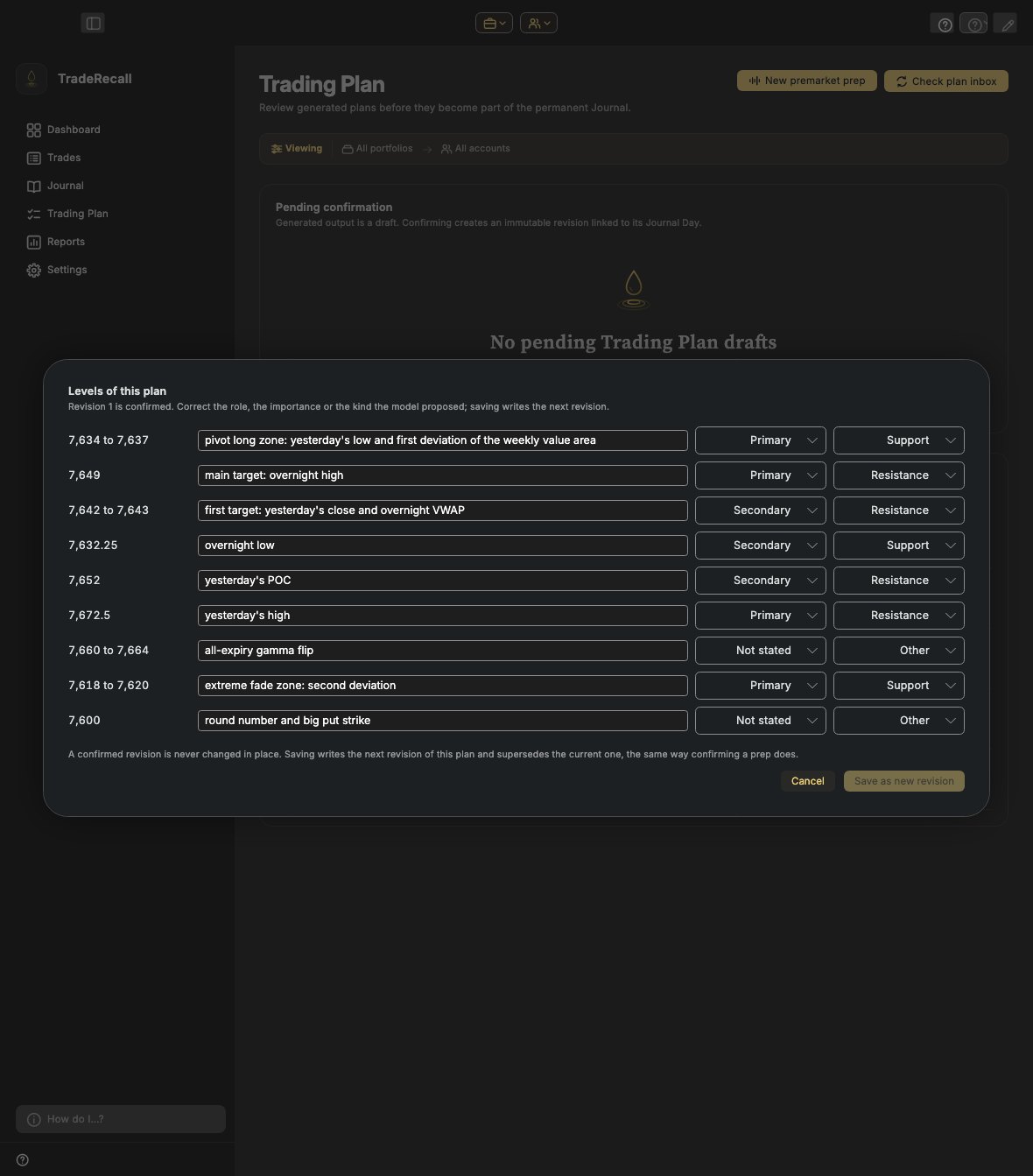
Premarket planFull: said or typed; the levels you confirm are drawn on your chartA page you write
Daily reviewFree: your reflection and chapters, typed, and a summary of the day saved as a file. Full: say chapters out loud and they become textA page you write
Numbers and place
Win rate and expectancyFree: per setup and per mistakeYour formulas and rollups
Where it is keptOn your computerIn Notion's cloud

Is there a free alternative to a Notion trading journal template?

Yes, and it does not need building. TradeRecall's free journal takes your trades from the file your platform exports, keeps each account apart and reports win rate and expectancy per setup and per mistake. Write your notes on the trade, as you would on a Notion page. It is free for good; the free key needs an email address, not a card. Free trading journal

What does TradeRecall add that Notion cannot?

The things that happen in your platform while the trade is open. In the full version your fills arrive by themselves, each stop and target move is kept, a chart picture is taken at each step, and you can say why you are in the trade without leaving the chart. Voice trading journal

The levels of a confirmed premarket prep in TradeRecall: each price or zone with its description, importance and role.

Questions

Can I keep my playbook in Notion?

Of course. TradeRecall keeps the trades, your words about them and the statistics; a playbook or a reading list can stay where you like it.

Does TradeRecall need an internet connection?

Your journal is on your computer. TradeRecall goes online for the licence, to look for updates, for exchange rates and to download its voice notes files.

Which platforms does TradeRecall work with?

Live: Sierra Chart, NinjaTrader, Quantower, MetaTrader 4 and 5, and cTrader. From a file: CQG Desktop, R|Trader Pro, MotiveWave and TradingView.

This page was checked on 27 October 2026. If something on it is wrong, tell us at support at traderecall.app and we will fix it.

TradeRecall is a trading journal for futures, forex and CFD traders that records every fill live from Sierra Chart, NinjaTrader, Quantower, MetaTrader and cTrader, puts what you say during a trade on that trade, and keeps everything on your computer.

Start free