TradeRecall

TradeRecall › Compare

Obsidian trading journal, or a free trading journal app

Traders who journal in Obsidian usually want two things: their notes in plain files on their own computer, and links between ideas. TradeRecall shares the first: your journal stays on your computer. It adds what a folder of notes cannot do, the trades themselves.

Start free

Free, no card. Plus a bonus: the full version for your first 30 days.

Free, and it stays free

  • enter trades and notes by hand, or import them from your platform's files;
  • standard reports, export and backup;
  • link your notes to trades by hand;
  • attach your own chart pictures to any note and to the day's review;
  • the full version for your first 30 days, no card; an email address for the key.
What stays manual

  • one note per trade, with its numbers typed into the front matter;
  • queries and plugins that break when a note is written differently;
  • screenshots of the chart, saved and linked by hand.

An Obsidian vault and TradeRecall

“Free” is TradeRecall's free journal, which does not expire; “full” is the full version, yours for the first 30 days.

Feature TradeRecall Obsidian
Where things live
Your journalOn your computerOn your computer, in your vault
Account or broker loginAn email address for the free key; no broker loginNone
Trades
Fills from your platformFree: imported from your platform's file. Full: live from Sierra Chart, NinjaTrader, Quantower, MetaTrader and cTraderTyped into each note
Stop and target movesFull: every move with its time, from Sierra Chart, NinjaTrader, Quantower, MetaTrader and cTraderTyped, if you note them
Chart picturesFull: taken by itself on your chart in the platform at every fill and every stop or target move; on NinjaTrader, Quantower, MetaTrader and cTrader also at every order placed or cancelledScreenshots you paste in
Words and numbers
NotesFree: typed. Full: spoken while the trade is openMarkdown notes, as long as you like
StatisticsFree: win rate and expectancy per setup and per mistakeWhat your plugins and queries build
SuggestionsFull: TradeRecall suggests setups and mistakes from what you said, on your computer; you confirmThrough plugins you choose

Is there a local, free trading journal app like Obsidian?

TradeRecall keeps your journal on your computer and its free part does not expire: trades and notes by hand, import from your platform's files, the standard reports and export. Where Obsidian gives you a blank page, TradeRecall gives you the trade, so your notes start from the fills and not from memory. Free trading journal

Does TradeRecall send my notes anywhere?

No. In the full version, reading your voice notes happens on your computer and only suggests; each suggestion waits for you to confirm it. Reading what you say needs 24 GB of memory or more; with less, your voice is only turned into text. Smart trading journal

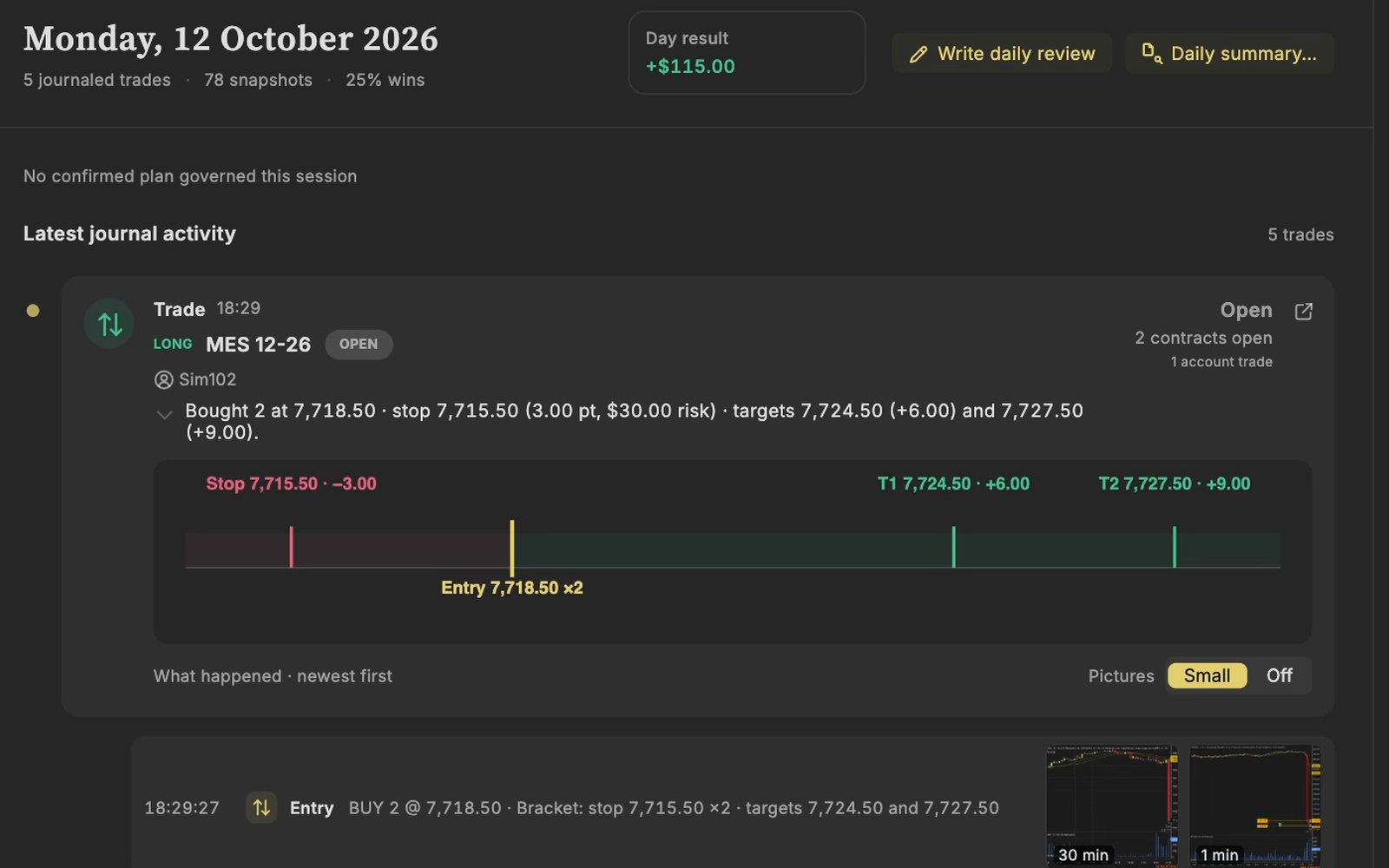
A trade in NinjaTrader on a Sim account, arrived in the TradeRecall journal with its stop and target.
Recorded on a Sim account in NinjaTrader.

Questions

Can I keep writing long notes in Obsidian?

Yes. TradeRecall keeps the trades, short notes on them and the statistics; long essays about your trading can stay in your vault.

Can I take my data out of TradeRecall?

Yes. Export and a backup of the whole journal are part of the free journal.

Does it work on a Mac?

Yes, on a Mac with Apple silicon, and on Windows.

This page was checked on 27 October 2026. If something on it is wrong, tell us at support at traderecall.app and we will fix it.

TradeRecall is a trading journal for futures, forex and CFD traders that records every fill live from Sierra Chart, NinjaTrader, Quantower, MetaTrader and cTrader, puts what you say during a trade on that trade, and keeps everything on your computer.

Start free