TradeRecall

TradeRecall › Compare

Tradervue alternative for futures traders: TradeRecall vs Tradervue

Tradervue is a web journal: you import or sync your executions and it builds trades, charts and reports from them. TradeRecall is a desktop journal that is there while you trade, and takes the trade from your platform as it happens.

Start free

Free, no card. Plus a bonus: the full version for your first 30 days.

Free, and it stays free

  • enter trades and notes by hand, or import them from your platform's files;
  • standard reports, export and backup;
  • link your notes to trades by hand;
  • attach your own chart pictures to any note and to the day's review;
  • the full version for your first 30 days, no card; an email address for the key.

TradeRecall fits you if

  • you trade futures, forex or CFDs and want the trade written while you are in it, not after an import;
  • your stop and target should come from the platform, not from a risk value you type in;
  • you trade prop firm accounts and want the trailing drawdown counted tick by tick, by the rule of your account;
  • you want to record your reasons by voice, which is not on Tradervue's site;
  • you want a free journal without a monthly trade limit.

TradeRecall vs Tradervue, side by side

Futures, forex and CFDs only, on the platforms TradeRecall works with.

Feature TradeRecall Tradervue
How your trades get in
Sierra ChartLive, from a study in your chartListed on their site; whether by file or by sync is not stated
NinjaTrader 8Live, from an add-onListed on their site; whether by file or by sync is not stated
MetaTrader 4 and 5Live, from an Expert AdvisorListed on their site; whether by file or by sync is not stated
cTraderLiveListed on their site; whether by file or by sync is not stated
QuantowerLiveNot on their list
Rithmic accountsLive through Sierra Chart, NinjaTrader or QuantowerListed on their site; whether by file or by sync is not stated
TradingViewImport of TradingView's own export for futures, with your stop moves from its Activity logNot on their list; their generic file format
What each trade keeps
Stop and targetRead from your platform, with every moveAn initial risk you enter yourself (Gold)
Chart pictureTaken by itself on your chart in the platform at every fill and every stop or target move; on NinjaTrader, Quantower, MetaTrader and cTrader also at every order placed or cancelledA TradingView chart with your entries and exits; images and videos you add to notes
Your voiceA hotkey while the trade is live: the note goes into that trade at the moment you said it, written out on your computerNot on their site
Plan and review
Premarket planSpoken; your levels drawn on your chartNot on their site
Trades you passed onSay you are passing and your numbers; checked later against the marketNot on their site
SuggestionsRuns on your computer and reads setups, mistakes and plan levels from what you sayNot on their site
Prop firm accountsEach account on its own. Trailing drawdown counted tick by tick by the rule you set, beside the balance Sierra Chart, NinjaTrader or Quantower reportNot on their site
Where it runs and what it costs
Where your journal livesOn your computer, Windows or a Mac with Apple siliconOn their servers, opened in the browser
Price$300 once, or $33 a month for 12 months, then it's yoursSilver $29.95 and Gold $49.95 a month
FreeThe journal is free and stays free; the full version for your first 30 daysA free plan with 30 trades a month; the trial asks for a card

Is Tradervue free?

It has a free plan that imports up to 30 trades a month. TradeRecall's free journal has no trade limit: you enter trades and notes by hand or import your platform's files, and read the standard reports and export whenever you like. For 30 days from your first trade, the live part comes with it, without a card. Free trading journal

Does Tradervue work with Quantower or TradingView?

Neither is on Tradervue's list of integrations; their generic import format is the way in for platforms that are not. TradeRecall records Quantower live and imports TradingView's own export, with the stop and target moves from its Activity log. Quantower trading journal

What only TradeRecall keeps

Reports built from executions show what happened. They cannot show why you did it, because nobody wrote it down at the time.

Said at the time

A key combination starts a voice note; it is kept in the trade you were in, at the second you spoke.

Stops from the platform

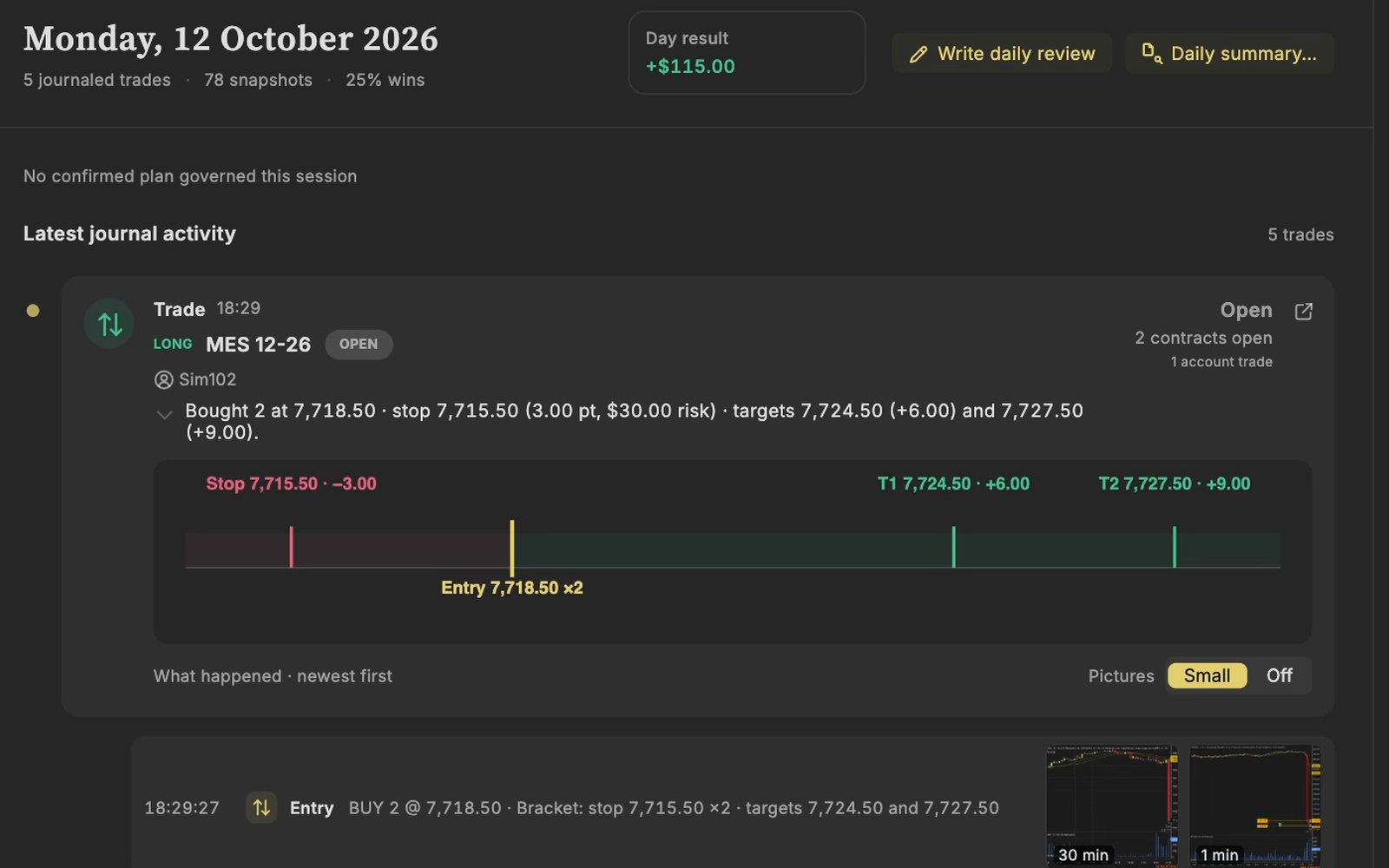
The stop you placed in your platform comes with the trade, with nothing to type, and each later move is kept.

A picture at each step

Every fill and every move of the stop or target, each with its picture of your chart.

A trade in NinjaTrader on a Sim account, arrived in the TradeRecall journal with its stop and target.
Recorded on a Sim account in NinjaTrader.

Questions

Does TradeRecall record MAE and MFE?

Yes. The highs and lows of each trade come from your platform, or from the ticks between your entry and exit.

Does TradeRecall show win rate and expectancy?

Yes. Per setup and per mistake: number of trades, win rate and expectancy, for the trades you tagged or confirmed.

Does TradeRecall need my broker password?

No. TradeRecall reads your trades inside your trading platform and does not ask for a broker login.

What we say about Tradervue comes from tradervue.com, its pricing page, its list of integrations, its terms and its help center, checked on 27 October 2026. If something there has changed, tell us at support at traderecall.app and we will fix this page.

TradeRecall is a trading journal for futures, forex and CFD traders that records every fill live from Sierra Chart, NinjaTrader, Quantower, MetaTrader and cTrader, puts what you say during a trade on that trade, and keeps everything on your computer.

Start free